



How Gutenberg to Elementor Works
Paste a WordPress URL
Enter a public Gutenberg page, full site editing theme, block theme demo, or WordPress page.
Detect Gutenberg blocks
We detect block editor structure like groups, covers, columns, buttons, headings, and images.
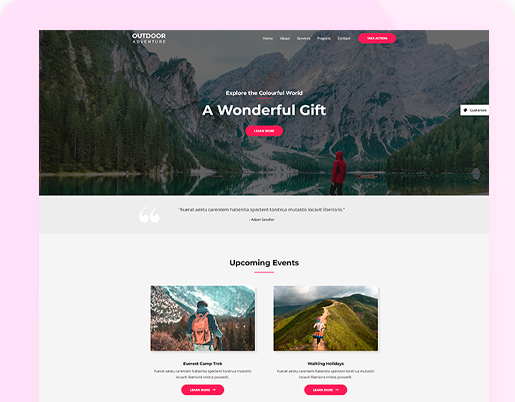
Check the preview
Review the generated Elementor page before export and confirm the Gutenberg structure is captured correctly.
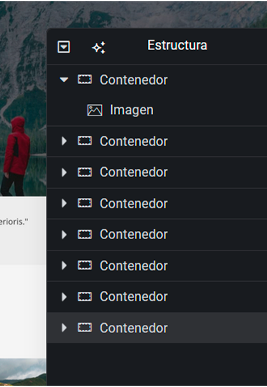
Export Elementor JSON
Download a native Elementor JSON file built with containers and editable widgets.

What Gutenberg Blocks Can Be Converted
Gutenberg pages are built from WordPress Block Editor blocks: Group, Cover, Columns, Column, Heading, Paragraph, Button, Image, Spacer, Navigation, Social Links, template parts, block themes, and Full Site Editing layouts.
Web2Elementor reads the rendered WordPress page and converts the visible block structure into Elementor JSON with native containers and widgets where possible.
Why Convert Gutenberg to Elementor
Use it for client rebuilds, redesigns, moving from the WordPress Block Editor to Elementor, converting block themes, reusing existing Gutenberg pages, and avoiding manual rebuilds from scratch.
- Convert WordPress blocks to Elementor JSON
- Check the preview before export



Gutenberg Conversion Pricing
Credits are shared across Gutenberg to Elementor, URL to Elementor, Image to Elementor, HTML to Elementor and the Chrome extension.
- 1 use every 2 months
- Preview before export
- Export Elementor JSON
- Chrome extension included (1 use)
- Export header, content & footer as ZIP
- 20 monthly credits
- All conversion tools included
- Chrome extension included
- Export header, content & footer as ZIP
- For hobby projects and occasional conversions
- 40 monthly credits
- All conversion tools included
- Chrome extension included
- Export header, content & footer as ZIP
- For developers and freelancers
- 80 monthly credits
- All conversion tools included
- Chrome extension included
- Export header, content & footer as ZIP
- For agencies and client production work
Trusted by 500+ users
Gutenberg to Elementor FAQ
Yes. Web2Elementor converts public WordPress Gutenberg and Block Editor pages into Elementor JSON by reading the rendered block layout, styles, images, and text.
Paste the public URL of a Gutenberg page, run the conversion, check the preview, and export the generated Elementor JSON for import into WordPress.
Yes. Gutenberg is the WordPress Block Editor, and this converter is built for common Block Editor layouts and block theme pages.
Many public block theme and full site editing pages can be converted. Header, footer, navigation, sliders, and plugin blocks should be checked in the preview because every theme renders blocks differently.
The strongest support is for common blocks such as Group, Cover, Columns, Column, Heading, Paragraph, Button, Image, Spacer, Navigation, Social Links, template parts, block themes, and full site editing layouts.
Yes. The output is Elementor JSON designed around Elementor containers and common native widgets that can be imported with Elementor Free.
This page is for Gutenberg to Elementor conversion. It converts WordPress blocks and Block Editor pages into Elementor JSON, not Elementor pages back into Gutenberg.
Accuracy depends on the source theme and blocks. Common Gutenberg layouts convert best; complex plugin blocks, sliders, and custom JavaScript may need manual review after export.
Convert Gutenberg, Block Themes and FSE Pages