


How It Works
Paste a URL
Enter the URL of any website - WordPress, landing page, portfolio, or online store.
AI analyzes
We detect sections, colors, typography, and structure automatically.
Edit visually
Adjust text, colors, and layout with our interactive editor.
Export JSON
Download and import directly into Elementor. Done!

Any URL, Fully Editable in Elementor
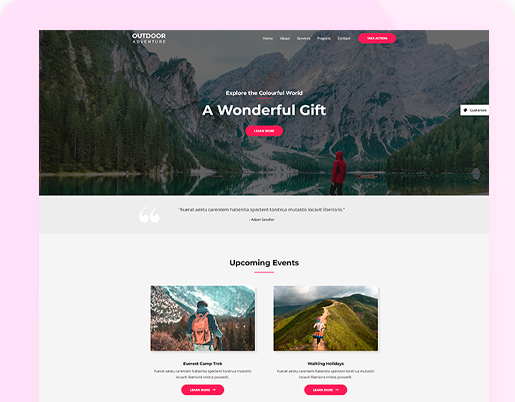
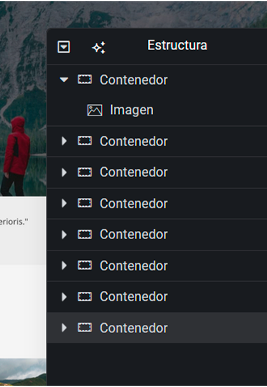
Paste any website URL and our AI breaks it down into clean, nested Elementor containers - preserving the original structure, sections, images, and hierarchy. Every element lands exactly where it should.
The result is a native Elementor template you can open, customize, and publish on your WordPress site - no rebuilding from scratch.
Edit With AI, Not Just Manually
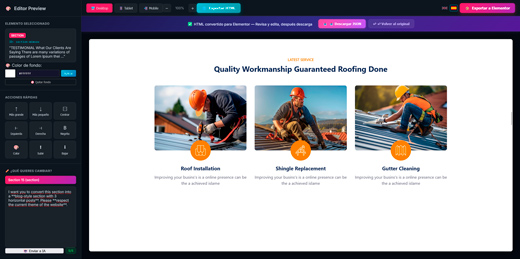
After conversion, our built-in visual editor lets you refine the result in real time. Click any element to change text, colors, or spacing - or simply tell the AI what you want and watch it happen instantly.
- Real-time visual preview
- AI-powered editing via chat


Plans & Pricing
Credits are shared across URL to Elementor, Image to Elementor, HTML to Elementor and the Chrome extension.
- 1 use every 2 months
- Simple visual editor
- Export Elementor JSON
- Chrome extension included (1 use)
- Export header, content & footer as ZIP
- 20 monthly credits
- All conversion tools included
- Chrome extension included
- Export header, content & footer as ZIP
- For hobby projects and occasional conversions
- 40 monthly credits
- All conversion tools included
- Chrome extension included
- Export header, content & footer as ZIP
- For developers and freelancers
- 80 monthly credits
- All conversion tools included
- Chrome extension included
- Export header, content & footer as ZIP
- For agencies and client production work
Trusted by 500+ users
URL to Elementor - Frequently Asked Questions
Just paste any website URL in the input field above and click "Convert". Our AI will fetch the page, analyze its layout, styles, fonts, and colors, and generate a fully editable Elementor JSON file. You can then preview the result in our visual editor, make adjustments if needed, and download the JSON to import directly into Elementor on your WordPress site.
You can convert virtually any public website - WordPress sites, landing pages, portfolios, Shopify stores, Wix pages, static HTML sites, and more. The tool works best with content-rich pages that have a clear visual structure. Pages behind login walls or heavy single-page applications (SPAs) may produce limited results since their content isn't accessible via a simple URL fetch.
Yes. Our AI extracts the computed CSS from the original page - including colors, font families, font sizes, spacing, backgrounds, and borders - and maps them to native Elementor settings. The result closely matches the original design. You can fine-tune any style in our visual editor before exporting, or adjust everything later inside Elementor itself.
Most conversions complete in under 2 minutes. The time depends on the complexity and size of the page - a simple landing page may take 30 seconds, while a large page with many sections could take a bit longer. Paid users get priority processing with no queue, so their conversions start immediately.
Yes. The conversion detects images on the original page and references them by their original URLs in the generated Elementor template. This means images will display correctly as long as they remain hosted on the source site. If you want to use your own images, you can easily swap them out in the visual editor or directly in Elementor after importing.
Absolutely. After conversion, you get a live visual editor where you can change text, colors, fonts, spacing, backgrounds, and more - all in real time. Free users get up to 5 manual edits per design. Paid users get unlimited manual edits plus AI-powered editing to make bulk changes instantly. Once you're happy with the result, just export the Elementor JSON.
The generated JSON is fully compatible with both Elementor Free and Elementor Pro. We use native Elementor containers and standard widgets (headings, text, images, buttons, spacers), so you don't need Pro to import and edit the template. However, if the original page uses advanced layouts, having Elementor Pro may give you more flexibility when customizing.
You can try URL to Elementor with the free plan, which includes 1 use every 2 months. If you need more conversions, choose a monthly subscription or buy pay-as-you-go credits. Credits are shared across all Web2Elementor tools and the Chrome extension.
Convert Sites Built on Any Platform